Buying Guides · Audio
How to Choose Wireless Headphones for Work: What Actually Matters
Choose work headphones by calls, comfort and connections. Our research-based Sony WH-1000XM6 pick and battery-focused alternative, with official links.
Published
THE CLEAR TAKEAWAY
Quick Answer
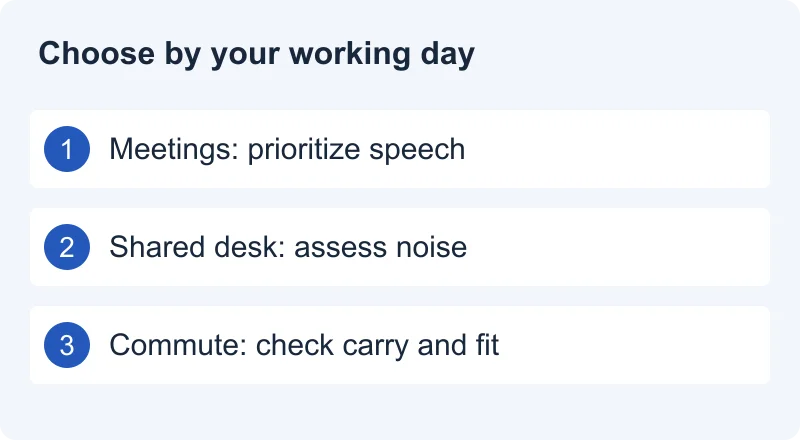
Choose around your working day: microphone clarity and dependable controls for meetings, comfortable fit and useful noise reduction for focus, and verified device switching if you use a laptop and phone. Confirm the exact connection and backup you need before paying for extra features.
Research Method / Evidence Basis
Public-source research. Official standards and manufacturer documentation checked October 12, 2026. Recommendations are editorial judgments about documented fit, not hands-on testing or measured comparisons.
The Short Answer
Start with the job you need headphones to do. If most of your day involves meetings, put intelligible speech, an easy mute control, and compatibility with your work computer first. If you mostly read, write, or code in a noisy room, give comfortable fit and noise reduction more weight. If your day moves between those tasks, look for a balanced setup rather than the most impressive feature list.
There is no single best pair for every workplace. A quiet home office, a shared desk, and a commute create different problems. This guide explains how to make a shortlist and what to check before keeping a purchase. The shortlist below uses documented features and editorial fit. We quote no prices and have not worn or tested these headphones.
One Clear Pick
One primary choice, one alternative. Researched October 12, 2026; not hands-on tested. No price or stock promises: check your region on the manufacturer’s page.
Our Pick · mixed workday
Sony WH-1000XM6
Best For: Desk listeners who also commute and switch devices.
Skip If: Your employer requires a certified headset or you need a boom microphone.
Why We Picked It: Sony documents ANC, multipoint and a folding design. These suit mixed listening and calls; fit and microphone performance still need your own check.
Why Not Others: We prioritize everyday flexibility over maximum advertised endurance. We have not established a sound, ANC or call-quality winner.
View at Sony →Official manufacturer link · not an affiliate link
Alternative · battery priority
Sennheiser MOMENTUM 4 Wireless
Best For: People prioritizing fewer charging sessions.
Skip If: You specifically want a folding design or a certified work headset.
Why We Picked It: Sennheiser advertises up to 60 hours of playback. Actual endurance depends on settings and use; this is not our measurement.
Why Not Others: Consider it when the published endurance matters most. We have not compared comfort or microphones; the newer generation does not make this documented feature irrelevant.
View at Sennheiser →Official manufacturer link · not an affiliate link
What Actually Matters
Write down your normal working day before opening a shopping page. Which computer and phone do you use? Which meeting app? Are you allowed to install a companion app? Do you need to hear colleagues nearby? How long is your longest uninterrupted session? Your answers should decide which features are essential.
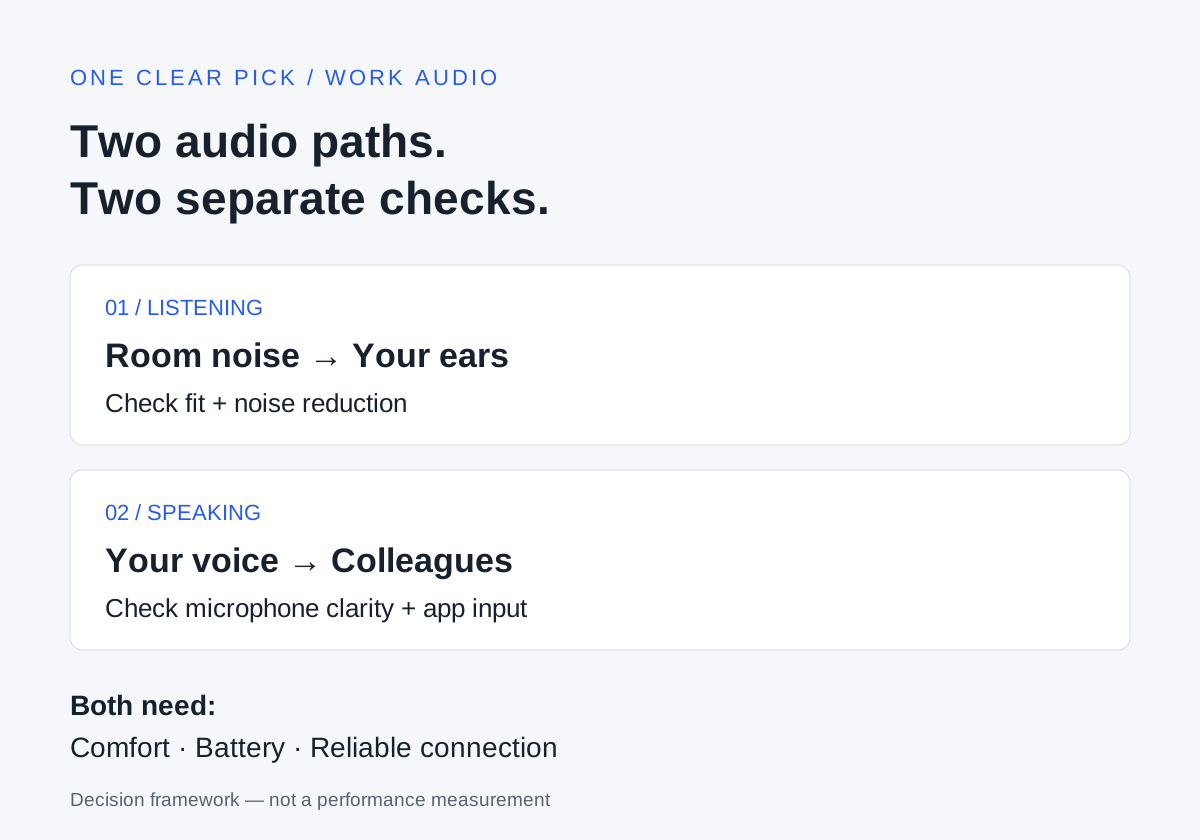
Think about two separate audio paths: what reaches your ears, and what reaches the person on your call. Excellent listening noise reduction is not evidence of excellent microphone performance. Evaluate each path separately, then check the things supporting both: fit, controls, power, and connection reliability.
Our suggested order is compatibility first, then the weakest part of your current setup. If colleagues already hear you clearly but room noise distracts you, address listening. If you hear well but repeatedly need to repeat yourself, investigate microphone input and call quality. A purchase should solve a named problem. Keep a short list of non-negotiables and eliminate options that cannot meet them, even if they have attractive extras.
ANC: Useful Quiet, Not Complete Silence
Active noise cancellation, or ANC, addresses the sound you hear. Bose explains that microphones and processing create an opposing signal, while physical fit provides passive isolation. It also describes steady background sounds as easier to reduce than changing sounds such as nearby voices. That is a useful explanation of the mechanism; it does not establish which brand performs best. Bose’s ANC explanation.
For a shared office, the practical question is whether the remaining noise is manageable. Do not interpret “noise cancelling” as a promise that nearby conversations will disappear. If speech is your main distraction, look for evidence addressing speech specifically rather than assuming that an impressive travel claim answers your office problem.
Decide how often you need awareness of your surroundings. Check whether the model offers an awareness mode, how you activate it, and whether that control is easy to find. During an allowed trial, compare your ordinary room with ANC on and off, including a period without music. This separates your impression of noise reduction from the distraction-masking effect of playback. Treat that as your own evaluation, not a result supplied by this article.
Microphone Quality: Judge What Other People Hear
For meetings, clear speech is a better buying criterion than a microphone count. A feature name does not tell you whether a colleague can understand an entire sentence in your actual room. Seek recordings or documented evaluations that identify the device, connection, environment, and software. A quiet-room sample cannot settle a question about a busy office.
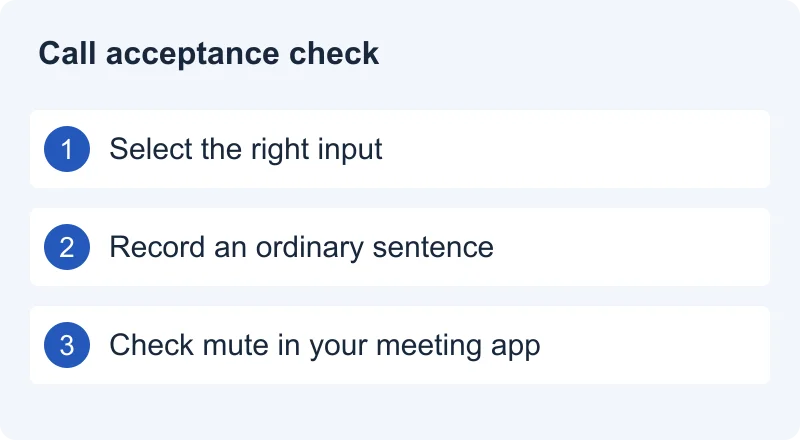
Before replacing hardware, confirm that the meeting app is using the intended microphone. Microsoft documents separate speaker and microphone selection and a recording-and-playback test call in Teams desktop where available. Use the current settings in your version; your organization or app may expose different options. Microsoft’s call settings guidance.
For your own acceptance check, record ordinary speech, leave a pause, and speak again with typical background activity. Listen for missing words and changes in voice clarity, rather than demanding an artificially silent recording. Follow workplace rules and avoid recording other people’s conversations. Then verify mute and unmute in the app: do not assume a headset button controls every meeting service. A physical control is useful only when its behavior is clear in the setup you use.
Comfort: A Personal Requirement
Treat comfort as something to verify, not a score you can borrow from another person. Write down what bothers you about your current pair: pressure around glasses, contact with your ears, a headband pressure point, or an in-ear fit you keep adjusting. Those observations make a more useful shopping filter than a general promise of premium comfort.
For over-ear models, investigate cup dimensions, adjustment range, and replacement cushions. For earbuds, check available tips and how you would charge them between sessions. Neither format automatically wins. Portability matters when you move between places; a fit that stays comfortable matters when you spend a long stretch at a desk. A listed weight alone cannot tell you which design you will tolerate.
If possible, try a pair with your normal glasses and usual posture. Make a deliberate fit check during a permitted trial rather than relying on the first minute. Keep packaging and read return conditions before opening the product; local rules and seller policies differ. If trying the fit is impossible, acknowledge that uncertainty in your decision instead of treating a reviewer’s comfort judgment as a guarantee.
Battery: Plan Around Your Longest Session
Decide when charging can realistically happen. A useful requirement might be “finish my longest meeting block with a reserve,” rather than “have the largest advertised number.” Compare the manufacturer’s figures for the relevant mode and read their conditions. A music-playback headline should not automatically become your estimate for a day of calls.
As a specific example, Sony’s WH-1000XM5 documentation lists ANC and several processing settings among functions that can shorten operating time. That establishes that settings matter for that model; it does not provide a measured runtime for your workload or a universal penalty for every pair. Sony’s battery guidance.
Check the practical backup: what charger is required, whether a quick-charge claim needs a particular adapter, and whether audio works while charging. Do not infer those capabilities from the connector’s shape. For earbuds, distinguish uninterrupted use of the buds from any total that includes recharging in a case. In your own trial, note charge before and after a representative session. Leave a reserve instead of designing your workday around a best-case claim.
Multipoint: Convenient Switching Needs Verification
If you use a laptop for meetings and a phone for calls, multipoint is worth investigating. Sony describes supported headphones maintaining connections to two sources so you can switch without the usual disconnection and reconnection process. Its instructions are product-specific, and describe pausing one source before playing another in a switching example. Sony’s multipoint guidance.
Distinguish remembered pairing from active connection, and active connection from simultaneous playback. A statement that headphones remember several devices does not answer how switching works during a meeting. Read the exact model’s manual for supported devices, activation steps, and any restrictions. Do not assume another model implements the same behavior as Sony’s example.
Before keeping a purchase, rehearse your workflow: connect both devices, start laptop audio, stop it, use the phone, and return to the laptop. Also check the effect of an incoming phone call during a meeting, in a private trial. Your preference may be to disable the second connection during important calls. If you work from one computer all day, simple dependable operation may matter more than paying extra for switching you rarely use.
Wired vs Wireless: Define Your Backup
Wireless is useful when you want to move away from your desk. A cable can be useful as an alternative, but “wired support” needs detail. Verify whether it carries listening audio, microphone audio, or both, and whether a powered headset is required for the features you expect. A charging port alone is not documentation of USB audio support.
Sony’s WH-1000XM5 cable instructions offer a concrete warning against assumptions: the documented phone-call setup uses the phone’s microphone, and ANC requires the headset to be powered on. The manual also says Bluetooth is unavailable while using that cable. These are limitations of that documented model and connection, not rules for all headphones. Sony’s cable instructions.
Connection can affect the listening experience during calls too. Apple documents reduced audio quality on Mac when an app uses a Bluetooth headphone microphone. Its explanation concerns the listening and two-way modes described there; it should not be generalized to every operating system or newer audio implementation. Apple’s Bluetooth guidance.
Our practical inference is to evaluate music listening and meetings separately. Where your software permits it, compare the intended headphone microphone with an available separate input. If a cable or USB receiver is your fallback, test that exact route, including mute, instead of discovering its limits during a call.
Common Buying Mistakes
- Buying for ANC alone. Decide separately whether the microphone meets your meeting needs. Listening quiet does not prove outgoing speech clarity.
- Comparing incompatible battery headlines. Find the relevant operating mode and conditions before treating two numbers as comparable.
- Assuming every connection preserves every feature. Write down what must work over Bluetooth, cable, or USB, then verify each route in the manual.
- Choosing by a feature badge. A codec label, driver description, or microphone count does not resolve comfort or your meeting workflow. Ask what problem the feature solves for you.
- Ignoring controls and setup. Check app permissions, mute behavior, and switching before the return window closes. If a work computer is managed, confirm permitted software and accessories with the appropriate team.
Avoid spending extra simply to remove every hypothetical limitation. Choose the compromise that matches your real work. An unused feature adds little value, while a basic incompatibility can make an otherwise appealing purchase unsuitable.
How We Research
This is public-source research checked on October 12, 2026. We consulted official support documentation and a manufacturer explanation of ANC, linked beside the relevant claims and listed below. Manuals establish documented functions and limitations; support pages explain specific workflows. Manufacturer marketing does not establish comparative superiority, and we do not repeat those claims as independent findings.
We have not conducted hands-on testing, measured microphones or ANC, verified battery endurance, or assigned ratings. There are no affiliate links in this guide. Our shortlist applies documented capabilities to stated use cases, without comparative test results. We do not extrapolate their behavior to every model, and we distinguish our practical buying advice from source-backed facts.
Our decision framework is editorial judgment: define the task, verify required functions, identify uncertainties, and use an allowed trial to resolve personal fit and workflow questions. Software, firmware, documentation, and availability can change. Recheck the exact model and your current platform before buying. See How We Pick for our broader approach and About One Clear Pick for the site’s purpose. Please use our contact page to report a correction.
Final Recommendation
For a meeting-heavy day, prioritize a verified microphone route, clear controls, and compatibility with your computer and app. For concentration in a noisy space, prioritize a comfortable fit and noise reduction suited to the actual sounds around you. For a mixed day, choose a setup that handles both listening and speaking, then verify switching only if it is part of your routine.
Before you keep a pair, answer five questions: Can people understand you? Can you wear it for your usual session? Does it work with your required software? Does power cover the session with a reserve? Does your backup connection do everything you need?
If one answer is uncertain, investigate it before treating the shortlist as a recommendation. The clear pick is the option whose trade-offs fit your day, with enough evidence to explain why. Explore our Buying Guides and Audio category as more research is published.
Compare Our Audio Shortlist
Ready for a named-product decision? Read Sony WH-1000XM6 vs Soundcore Space One Pro: Is Premium ANC Worth It for Work? for our research-based US verdict on ANC, calls, comfort, switching, battery and value.
Sources and References
- Sony WH-1000XM6 official product page
Model and capabilities checked October 12, 2026. Manufacturer claims, not independent measurements. Pricing and availability vary; verify your region on the official page.
- Sennheiser MOMENTUM 4 Wireless official product page
Model and capabilities checked October 12, 2026. Manufacturer claims, not independent measurements. Pricing and availability vary; verify your region on the official page.
- Bose: How do noise cancelling headphones work?
Passive isolation, ANC, and the limits of reducing voices. Manufacturer explanation, not independent comparative testing. Accessed October 12, 2026.
- Apple: If sound quality is reduced when using Bluetooth headphones with your Mac
Audio changes when the Bluetooth microphone is active. Scope: the Mac behavior described by Apple. Accessed October 12, 2026.
- Sony: Connect the headphones to two devices simultaneously
Multipoint setup and switching; applies to specified Sony products. Accessed October 12, 2026.
- Sony WH-1000XM5 / WH-1000XM5SA: Using the supplied headphone cable
Model-specific example of cable, microphone, and powered ANC limitations. Accessed October 12, 2026.
- Sony WH-1000XM5 / WH-1000XM5SA: The available operating time is short
Model-specific example of settings affecting battery duration; no runtime independently verified here. Accessed October 12, 2026.
- Microsoft: Manage your call settings in Microsoft Teams
Selecting speaker and microphone and using the desktop test call where available. Accessed October 12, 2026.