Buying Guides · Workspace Tech
What Height Chair Do I Need for a Standing Desk?
Calculate a starting seat height from your keyboard and seated elbow measurements, then check chair range, foot support and clearance before buying.
Published
THE CLEAR TAKEAWAY
Quick Answer
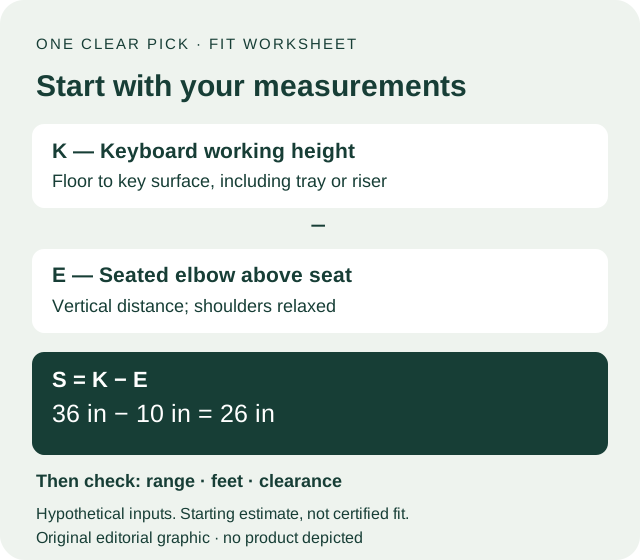
30-second answer: For a desk that lowers, fit the chair to your supported seated position first, then lower the keyboard to suit. For a fixed high surface, estimate occupied seat height as keyboard working height minus your seated elbow-above-seat distance. A hypothetical 36-inch keyboard level minus 10 inches gives a 26-inch starting seat height. Buy only after the actual chair range, foot support and under-desk clearance also work.
Research Method / Evidence Basis
Public-source research. OSHA and CCOHS workstation guidance checked October 20, 2026. Calculations, range screening and worked examples are editorial planning tools, not an ergonomic standard or product tests. We have not owned, sat in or measured chairs for this article.
Editorial responsibility: One Clear Pick · How we research and recommend
This article contains ordinary source/manufacturer links, with no affiliate purchase links. How commissions work.
| Your situation | Starting decision | Before buying |
|---|---|---|
| Desk lowers to your seated working level | Keep or fit a regular adjustable office chair first | Confirm keyboard position and supported feet together |
| Fixed high surface; target is inside the chair range | Candidate passes the height screen only | Verify occupied height, foot support and leg clearance |
| Target exceeds maximum seat height | Reject that configuration on paper | Lower the working level or choose a documented suitable range |
| Target is below minimum seat height | Chair is too tall for that planned position | Check a lower chair; do not raise the desk just to justify a purchase |
| Target sits at a published endpoint | Treat fit as uncertain | Ask how height was measured and confirm return terms |
| Height works but support or clearance fails | Do not buy on height alone | Resolve the workstation constraint first |
The useful number is floor-to-seat height while you are sitting, not the height of the backrest or the word “drafting” in a listing. This guide turns workstation measurements into a shortlist filter. It does not rank chairs or promise that a calculated height will feel comfortable.
Still deciding between chair types? Read drafting chair vs office chair. Already know you need elevated seating? Complete this worksheet before using our drafting-chair buying guide.
Measure your inputs
Use one unit throughout, wear your usual work shoes and keep the actual keyboard and mouse in place. A helper can make the vertical measurements easier.
For a desk that lowers: establish a usable seated position with supported feet and back support, then bring the working level to that position. CCOHS’s sit/stand guidance emphasizes fitting both positions, with relaxed shoulders and roughly level forearms. You do not need to match the chair to your standing preset.
For a surface that stays high: record these inputs before shopping:
- K — keyboard working height: floor to the key surface at your intended seated setting. A tray below the desktop changes K; a keyboard or riser above it changes K too.
- E — seated elbow-above-seat distance: on a chair you can use safely, sit with back support, shoulders relaxed and upper arms beside you. Bend your elbows to approximately a right angle. Measure vertically from the occupied seat surface to the underside of the elbow. Do not measure along the arm.
- B — supported baseline seat height: floor to the occupied seat when your feet are supported on the floor and the seat fits your legs. Keep the same footwear and posture as for E.
- U — underside clearance: floor to the lowest obstruction along the chair’s approach, including a drawer, apron or tray. Record usable knee width and depth as well.
CCOHS’s chair-adjustment advice connects fixed work surfaces, elbow position and foot support. The worksheet below is our arithmetic interpretation for shopping, rather than a formula supplied by CCOHS.
Calculate and screen
Starting occupied seat height: S = K − E.
Suppose K is 36 inches and E is 10 inches. S is 26 inches. In metric, the same calculation is 91.44 − 25.40 = 66.04 cm; reporting it to the nearest centimeter is more useful than pretending the measurement is precise to hundredths.
Next compare S with the exact chair configuration’s published minimum L and maximum H:
Paper height screen: L ≤ S ≤ H.
For the hypothetical 26-inch target, an advertised 18–22-inch chair fails; a 24–30-inch chair passes this first screen. A 26–32-inch range places the target at its minimum, so there is no downward adjustment room on paper. These ranges are invented examples, not specifications of recommended models.
Do not add an arbitrary “ergonomic allowance” to S. Instead, prefer useful adjustment room on both sides and ask how the seat range was measured. Cushion compression, seat tilt, casters and cylinder options can change the occupied result. We have no universal correction factor. A candidate close to an endpoint needs better documentation and a practical return path.
For a lowered desk, you can reverse the calculation: starting keyboard level K = B + E. With a hypothetical supported 18-inch seat and 10-inch elbow distance, start near a 28-inch keyboard level. Adjust the desk and assess actual reach rather than buying a taller chair because the desktop’s lowest printed setting sounds high.
Worked scenarios
1. An adjustable desk that reaches your seated position
Your hypothetical B is 18 inches and E is 10 inches. You can set the keyboard near 28 inches without a drawer blocking your legs. Start with the chair that already supports you. A drafting chair with a 24-inch minimum would add an unnecessary height mismatch in this example.
2. A fixed counter with a 36-inch keyboard level
With E = 10 inches, S = 26 inches. The candidate must reach that occupied seat position, but height is only the first decision. If B = 18 inches, you have also raised the seat 8 inches above your floor-supported baseline. Plan foot support before ordering; see the next section.
3. A high surface with a 42-inch keyboard level
Using the same hypothetical E gives S = 32 inches. A chair topping out at 30 inches fails the height screen. A chair reaching 32 inches only just meets it on paper. Before looking for an even taller model, investigate whether the keyboard can be lowered with a compatible tray or the work surface changed. Evaluate mounting space, reach and clearance together. Elevated entry and exit also become part of the decision.
4. A shared desk or two working levels
Calculate each person’s target separately. For one person using two seated keyboard levels K1 and K2, calculate S1 and S2. The documented seat range must cover both targets: L ≤ min(S1, S2) and H ≥ max(S1, S2). Recheck foot support and clearance at each position. There is no requirement for a seated chair to reach the standing keyboard setting when the desk can lower.
Foot support and clearance
A second planning estimate is support elevation F ≈ S − B, when S is above your floor-supported baseline. In scenario 2, 26 − 18 = approximately 8 inches. This is the elevation of a possible support surface above the floor, not a manufacturer’s foot-ring setting or a guaranteed ergonomic dimension. It assumes a similar seated leg position and must be checked in use.
OSHA’s chair guidance calls for feet supported on the floor or a footrest and a seat that lets you use the backrest. A ring may not provide the contact area or reach you need. Check whether both feet remain supported when you sit back; do not accept a ring merely because it appears in a photo.
For clearance, compare the armrest top at your intended seat setting with U. As a rough paper calculation, an armrest 8 inches above a 26-inch seat reaches 34 inches from the floor. If the lowest apron is at 33 inches, that armrest cannot pass beneath it in that configuration. Actual arm shape, approach angle and manufacturer measurements still matter. Lowering or folding compatible arms may solve arm interference, but it does not create thigh room.
Seat height alone cannot establish leg clearance. Check your thighs and knees while seated, and verify that the base, ring and any footrest leave room to approach, turn and get off. Do not use loose cushions, blocks or an improvised cylinder conversion to test a height beyond a chair’s intended configuration.
Mistakes to avoid
- Subtracting a generic dining-chair gap from desktop height. Keyboard work needs your seated measurements and actual input level.
- Using total chair height as seat height. A tall backrest tells you nothing about the lift range.
- Treating a pass on paper as a fit guarantee. Confirm the occupied position, reach, support and controls during a permitted trial.
- Buying taller seating to compensate for every desk problem. A thick apron or distant keyboard may require a workstation change.
- Choosing a stool from the height number alone. Bar stools, perch stools and task chairs have different support and access designs.
Skip elevated seating for now if you cannot arrange usable foot support, approach the keyboard without obstruction or get on and off manageably. Resolve those constraints first. If discomfort persists or you need an individual accommodation, a workstation assessment can address questions this shopping worksheet cannot.
Take your measurements to the buying guide
Write down K, E, B, S, U, the candidate’s documented seat range and the unresolved support or clearance questions. Keep seller answers with the exact model and configuration. Then use our best drafting chairs for standing desks to compare candidates. Its product-source and availability dates remain those stated in that guide; this article does not refresh them.
Our chair-category comparison explains when regular office seating is the more practical route. Choosing to keep a suitable existing chair is a useful outcome of this worksheet.
Research method and limits
We checked the linked OSHA and CCOHS guidance on October 20, 2026. The equations, fictional dimensions and shortlist decisions are One Clear Pick editorial analysis. They are starting tools for keyboard work, not certified fit calculations, medical advice or evidence that any chair is comfortable. We performed no sitting trials or product measurements. See how we pick and our affiliate disclosure. This article has no affiliate purchase links.
FAQ
What height chair do I need for a 36-inch standing desk?
Measure the keyboard working level rather than assuming it equals the desktop height. If that level is 36 inches and your seated elbow-above-seat distance is 10 inches, the starting seat estimate is 26 inches. Those inputs are hypothetical; your measurement and supported seated trial decide.
What about a 42-inch standing desk?
With a hypothetical 42-inch keyboard level and 10-inch elbow-above-seat distance, the estimate is 32 inches. That may exceed some chairs’ ranges. Check the exact configuration, foot support, clearance and entry before considering elevated seating.
How many inches should be between the chair seat and desk?
For keyboard work, use your measured seat-to-elbow distance and the actual keyboard level as a starting point. A universal desktop-to-seat gap ignores your proportions, keyboard thickness and trays. Clearance underneath is a separate check.
Can I choose seat height from my body height alone?
A body-height chart can provide a rough starting point, but it cannot capture your particular leg and torso proportions, shoes, seat compression or workstation. Measure the seated position you intend to use before choosing a chair range.
Does seat height include the backrest?
No. For this worksheet, seat height is the vertical floor-to-seat surface distance where you sit. Total chair height includes the backrest. Ask the seller whether the published seat range is occupied or unloaded and which cylinder and casters it includes.
Should I keep my standing desk raised when sitting?
If it lowers to a suitable seated working level, use that adjustment first. A fixed high surface needs a separate elevated-seating assessment. A tall chair is not required simply because a desk is sold as a standing desk.
Sources and References
- CCOHS: How to Adjust Office Chairs
Chair and fixed-surface adjustment, elbow position and supported feet. Checked October 20, 2026; does not prescribe our equations.
- CCOHS: Sit/Stand Desk
Fit seated and standing working positions separately. Checked October 20, 2026.
- OSHA: Computer Workstations — Chairs
Seat, foot support, backrest and armrest fit checks. Checked October 20, 2026; not chair-category testing.