Comparisons · Workspace Tech
Drafting Chair vs Office Chair: Which Is Better for a Standing Desk?
Choose a chair for your standing desk by measuring desk height, seat height, foot support and armrest clearance. Know when a drafting chair makes sense.
Published
THE CLEAR TAKEAWAY
Quick Answer
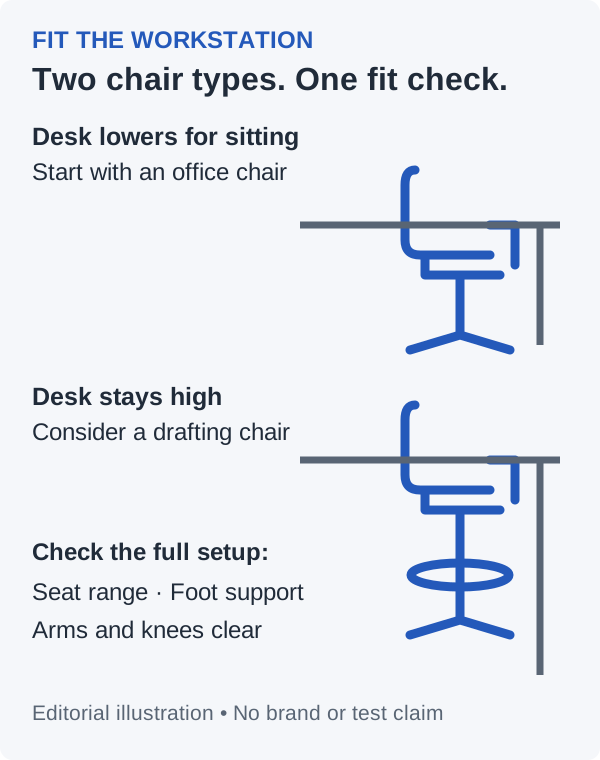
30-Second Answer: If your adjustable standing desk lowers to a comfortable seated working height, usually start with a regular adjustable ergonomic office chair. A drafting chair is more likely to fit a fixed high desk or counter-height workstation, provided its seat range, foot support and arm clearance fit you. The desk label alone does not decide.
Research Method / Evidence Basis
Public-source research. Research-based category comparison. OSHA and CCOHS workstation guidance checked October 17, 2026; chair-category recommendations and measurement examples are editorial analysis. We have not owned, sat in or tested chairs for this article. No medical outcomes or universal comfort ranking are claimed.
Editorial responsibility: One Clear Pick · How we research and recommend
This article contains ordinary source/manufacturer links, with no affiliate purchase links. How commissions work.
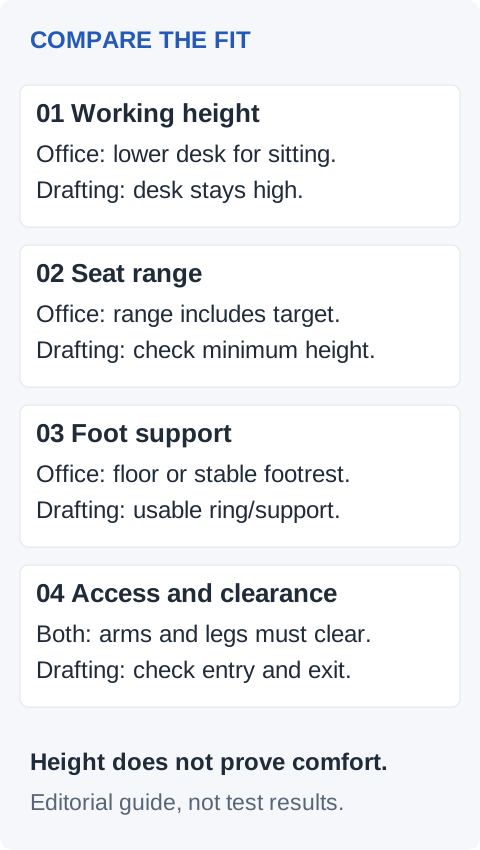
| Decision factor | Regular office chair | Drafting chair |
|---|---|---|
| Desk height | Usually the starting point when the desk lowers for seated work | Consider when the surface stays too high for ordinary seated work |
| Required seat height | Exact model must include your measured seated position | Extended range may reach a high surface; minimum can be too tall for a lowered desk |
| Foot support / foot ring | Floor support may work; a separate footrest may still be needed | Check ring height and usable support; a ring alone does not establish fit |
| Armrest clearance | Measure at the chosen seat height against the lowest desk obstruction | Repeat at elevated height; consider adjustable, flip-up or armless designs |
| Mobility | Check caster compatibility, swivel and approach to desk | Also check getting on and off and ring/base clearance at height |
| Long-session ergonomics | Check seat depth, backrest, controls and ability to change position | Require the same checks plus sustained usable foot support; extra height proves no comfort advantage |
| Best-fit reader | Sit-stand desk user who lowers the surface for sitting | Fixed high workstation user whose full setup supports seated work at height |
First decide what “standing desk chair” means for you
A height-adjustable desk and a fixed high counter create different seating problems. For a desk that lowers properly, our starting recommendation is an adjustable office chair: use the desk’s travel to establish your seated position. Keeping that desk raised just to accommodate a tall chair adds a fitting problem you may not need.
For a surface that cannot lower, a drafting chair may supply the extra seat height. It still has to work as a complete seated workstation. A chair for a standing desk is not automatically suitable because its listing uses that phrase. “Drafting,” “task stool” and “standing desk chair” are shopping labels; compare the actual configuration.
If measurements point toward elevated seating, continue to our best drafting chairs for standing desks buying guide. It compares specific models and specification caveats. This article settles the category decision first and contains no affiliate purchase links.
Measure before choosing: six practical steps
Have a tape measure, your usual work shoes and your actual keyboard setup ready. Record the following values in inches or centimeters consistently. Do not buy from a generic desk-to-chair height chart alone.
1. Measure the working surface and the space underneath
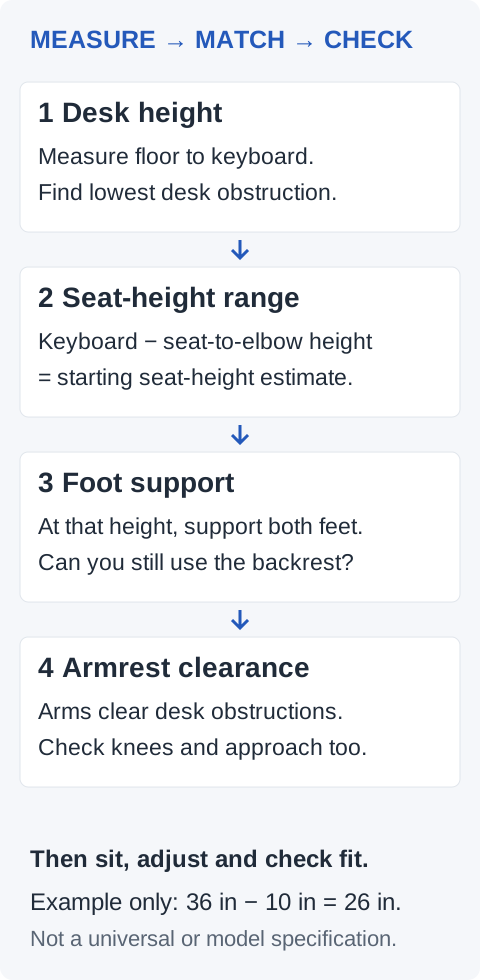
Record floor-to-keyboard height at your intended sitting setting, including any desktop riser or keyboard tray. Separately measure floor-to-lowest obstruction under the desk: an apron, drawer, tray or crossbar may matter more than the desktop edge. Measure usable knee width and depth as well.
For an adjustable desk, record its lowest usable setting with your equipment installed. For a fixed counter, record the actual surface height rather than assuming that “counter height” means a particular number. CCOHS’s sit/stand guidance calls for fitting both working positions. That supports our decision to evaluate seated fit separately from standing fit.
2. Find your seated baseline
On an adjustable chair you can use safely, establish a position with supported feet and usable back support. Check the seat edge and depth, then measure the occupied seat height from the floor. Cushion compression makes this different from an unloaded catalog measurement.
CCOHS’s chair-adjustment guidance links chair, work surface and foot support. Its practical adjustment advice includes checking seated fit before adapting to a fixed surface. Our next calculation is a shopping estimate, not a standard or a measurement we performed.
3. Estimate the required seat-height range
With shoulders relaxed and upper arms beside you, measure the vertical distance from the occupied seat to your elbow. Use the keyboard working level as the starting target for your forearm position.
Starting seat-height estimate = keyboard working height − your seated elbow-above-seat measurement.
For illustration only: a 36-inch working level minus a hypothetical 10-inch seat-to-elbow distance gives a 26-inch starting seat height. A chair advertised as 18–22 inches would not reach that estimate; one advertised as 24–30 inches would include it on paper. These are invented arithmetic inputs, not product specifications or a recommended height for everyone.
Recheck by sitting at the workstation: keyboard thickness, arm position, seat tilt and cushion compression affect the result. Prefer adjustment room around your target. If the target is at the very end of a catalog range, ask the seller how it was measured and use the return policy to resolve uncertain fit. Never test a tall position by stacking loose cushions or raising a chair on blocks.
4. Solve foot support at that seat height
If both feet no longer reach the floor comfortably, plan a stable support surface. For a drafting chair, check the ring’s height range, diameter, position and adjustment instructions against where your feet actually land. Can you use the backrest while keeping both feet supported, or do you have to slide forward to reach the ring?
A narrow circular ring and a platform offer different contact areas. Our editorial check is whether the support works for your feet and task, rather than whether a ring appears in a product photo. A separate footrest may be an option only if it is stable, reachable at the required height and leaves room to enter and exit. Do not assume a small floor footrest will solve a large height gap.
5. Check armrest and thigh clearance
At the proposed seat setting, compare floor-to-armrest-top height with the lowest obstruction measured in step 1. Include the chair’s approach path and space for your thighs and knees. A nominally lower armrest may still hit a drawer before you get close enough to the keyboard.
OSHA’s chair guidance addresses armrests that obstruct positioning and casters unsuitable for the floor. Our buying implication: confirm the chair can approach your desk and move appropriately on your flooring. Adjustable or flip-up arms can help some setups; armless seating trades clearance for the loss of that support option.
6. Check the whole working session
During a permitted trial or return period, check ordinary typing, reaching, turning and getting on and off. At an elevated position, pay particular attention to whether the chair moves away during entry and whether the ring or base catches the desk or footrest. Follow the manufacturer’s instructions for the supplied casters or glides; do not improvise a lift-cylinder conversion.
Try the seat depth, backrest and controls during your normal tasks. Our category preference is conditional on those checks. Neither a taller cylinder nor an “ergonomic” badge establishes better long-session comfort. Change positions as needed; no chair category removes the need to move.
Who should choose a drafting chair?
Consider a drafting chair when your desk or workbench stays high, your measured seat target exceeds the usable range of ordinary chairs you are considering, and supported elevated sitting is practical for you.
Before shortlisting, confirm all four: a documented seat range that includes your target; usable foot support; room for arms and legs; and manageable entry, exit and movement. If a specification is missing, ask the seller rather than treating marketing imagery as a measurement. Our drafting-chair buying guide flags model-specific uncertainties to investigate after this category check.
Who should choose an office chair?
Usually start here if your sit-stand desk lowers to your seated working level and the chair fits your body. This can also be the right answer when you already own a suitable adjustable chair: measure and adjust the desk before replacing it.
For readers who spend much of the day seated, prioritize the exact seat, backrest and control adjustments you need over the category name. We favor the simpler fitting route of a lowered desk and regular chair when it works; we have not established that every office chair is more comfortable than every drafting chair.
When neither is the right solution
- The desk blocks your legs or forces excessive reach. Reconfigure the work surface or consider a suitable keyboard tray or different desk before expecting a chair to solve the geometry. Verify any accessory’s mounting and clearance requirements.
- No practical foot support works at the necessary height. Reconsider the fixed high workstation rather than accepting dangling feet or an unstable improvised platform.
- Getting into elevated seating is difficult. Reassess the workstation height and access needs before choosing a tall chair.
- You want occasional leaning rather than supported seated work. A purpose-designed leaning or perch stool is a different category; it needs its own fit assessment and is not automatically a replacement for a seated task chair.
- You need individual accommodations or have persistent discomfort. A workplace assessment may be more useful than choosing between two generic chair labels. This comparison cannot prescribe a medical solution.
Research method and limits
We reviewed the linked OSHA and CCOHS primary guidance on October 17, 2026. That guidance informs the fit checks; it does not test drafting chairs against office chairs or endorse our category verdict. Recommendations, the comparison table and the arithmetic example are One Clear Pick editorial analysis.
We performed no hands-on chair tests and report no ownership, comfort scores, stability measurements or medical benefits. No model specifications are introduced in this comparison. Manufacturer and retailer specifications in the linked buying guide remain attributed, dated claims that should be reconfirmed for the exact model; linking that guide does not refresh its stock checks. Read how we pick for our evidence policy.
FAQ
Does a standing desk need a drafting chair?
Usually not if it lowers to a comfortable seated height. Consider a drafting chair when the surface remains high and the complete elevated seating setup fits. Measure the working level before choosing a category.
Can I use a regular office chair with a standing desk?
Yes, if the desk’s seated setting and the chair’s usable range fit you together. An existing chair may already work. Check the lowest desktop or keyboard height and under-desk clearance first.
How do I judge the right seat height?
Measure your actual keyboard level and seated elbow-above-seat distance for a starting estimate, then check fit while seated with your feet supported. Use the six steps above; do not substitute total chair height or backrest height for seat height in a listing.
Is a foot ring necessary on a drafting chair?
Usable foot support is the requirement to solve; a ring is one possible design. If the floor is out of reach, confirm that the ring or an appropriate stable footrest supports your feet without pulling you away from the backrest. A ring alone does not prove suitable support.
Is a drafting chair better for long sessions?
We have no head-to-head evidence establishing a category winner. At a high workstation it may solve the height problem, but seat fit, back support, controls and foot support still matter. At a desk that lowers properly, a regular adjustable office chair is usually our starting point.
Can one drafting chair work at both desk heights?
Only if its actual seat range includes both required positions and the rest of the setup works at each. A drafting chair’s minimum may be too high for ordinary seated desk work. Verify the exact model rather than assuming one tall chair covers every position.
Sources and References
- OSHA: Computer Workstations — Chairs
Primary workstation guidance on feet, seat fit, armrests and floor-compatible casters; checked October 17, 2026. Not a comparison test of chair categories.
- CCOHS: Office Ergonomics — How to Adjust Office Chairs
Primary guidance on chair adjustment, fixed work surfaces and foot support; checked October 17, 2026.
- CCOHS: Office Ergonomics — Sit/Stand Desk
Primary guidance on setting up both seated and standing positions and varying position; checked October 17, 2026.